JavaScript Data Types
Data types control how values behave in your code. If you understand them well, you avoid confusing bugs and write logic that works reliably in real projects.
Everything in programming revolves around data. A person's name, age, account balance, and whether they are logged in are all data that a program can store and use.
Different values have different types, and the type helps JavaScript decide how a value behaves:
const name = "John"; // string
const age = 30; // number
const loggedIn = true; // boolean
The main idea is simple: JavaScript values have types, and understanding those types helps you predict how JavaScript will behave.
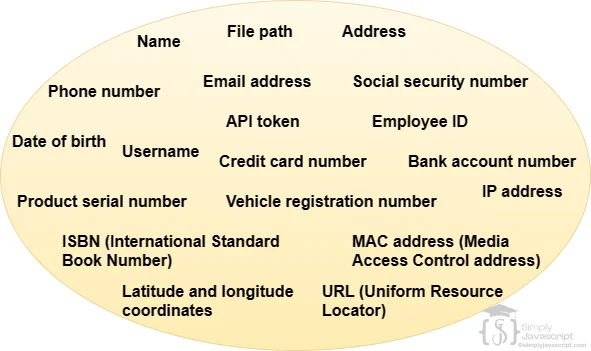
Data is information. JavaScript can work with numbers, text, true/false values, lists, and structured groups of information.
42
"Hello"
true
[1, 2, 3]
{ name: "John" }
Each form has a useful job: numbers support calculations, strings hold text, booleans support decisions, arrays group items, and objects organize related data.
A value is a specific piece of data. Examples include 42, "SimplyJavaScript", true, null, and undefined.
JavaScript values are commonly discussed in two broad groups:
- Primitive values: individual values such as numbers, strings, booleans,
bigint,symbol,null, andundefined. - Objects: values that can contain collections of other values. Arrays and functions are special kinds of objects.
This is only an overview. Next, we will define data types and then look at each group one step at a time.
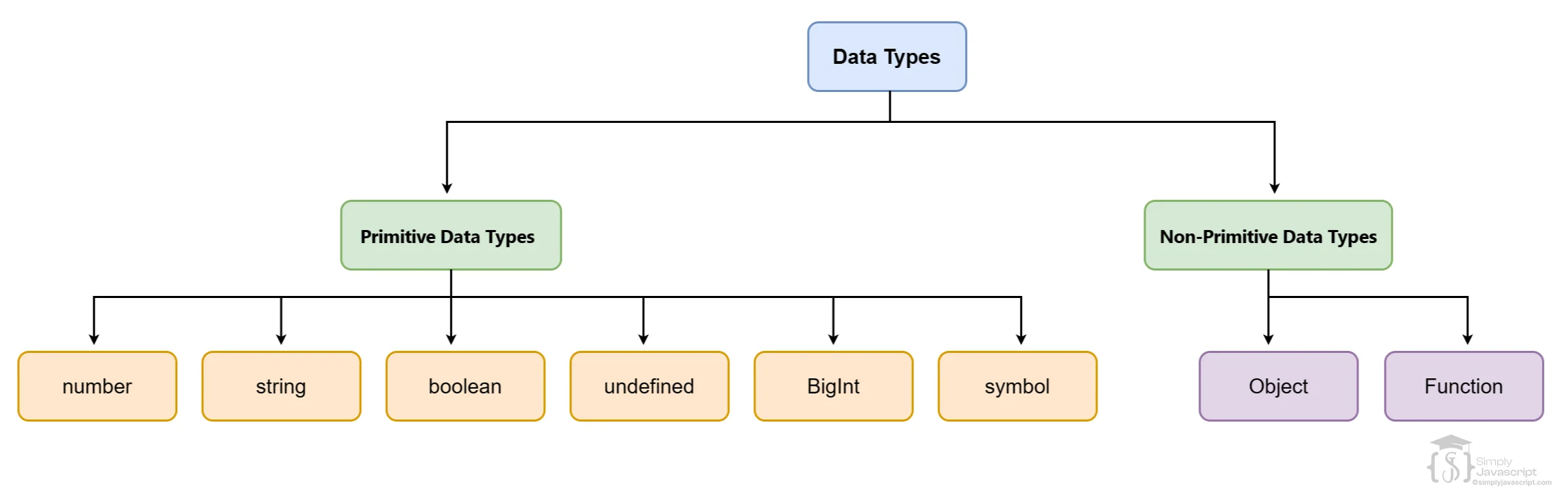
A data type describes what kind of value something is. For example, 30 is a number, "hello" is a string, and true is a boolean.
A variable can refer to values of different types over time. It is the values that have types, not a permanent type label attached to the variable.
| Category | Types and examples |
|---|---|
| Primitive | string, number, bigint, boolean, undefined, null, symbol |
| Object | object, array, function, and other object values |
You do not need to memorize everything yet. We will look at each category and use examples to make the differences practical.
Primitive values are individual values rather than collections of values. JavaScript has seven primitive types:
- String: text, such as
const name = "Sajid"; - Number: whole numbers and decimals, such as
const price = 99.99; - BigInt: integers larger than
Numbercan safely represent, such as12345678901234567890n - Boolean:
trueorfalse, such asconst isLoggedIn = true; - Undefined: a value commonly seen when no value is available, such as
let username; - Null: an intentionally empty value, such as
const selectedUser = null; - Symbol: a unique value often used as a unique property key, such as
const id = Symbol("id");
Beginner tip: BigInt and Symbol are useful to recognize, but you do not need their advanced details to start writing everyday JavaScript.
JavaScript commonly groups values into primitive values and objects. An object can contain multiple related values.
const user = {
  name: "SimplyJavaScript",
  age: 21
};

const numbers = [1, 2, 3]; // arrays are objects

function add(a, b) { // functions are objects too
  return a + b;
}
“Non-primitive” is a useful teaching label for objects, not a separate JavaScript type returned by typeof. Objects, arrays, and functions can all be inspected or used in different ways.
Once you know that values have types, you need a way to inspect them. The typeof operator returns a string describing a value's type or category.
console.log(typeof 10); // "number"
console.log(typeof "hello"); // "string"
console.log(typeof true); // "boolean"
console.log(typeof {}); // "object"
console.log(typeof []); // "object"
console.log(typeof function () {}); // "function"typeof null is "object" because of historical JavaScript behavior. Functions are objects, but typeof gives them the special result "function". It is useful, but it is not a perfect formal taxonomy of every value.undefined commonly appears when JavaScript has no value available, such as an uninitialized variable or a missing object property. null is an intentional choice by the programmer to represent “no value” or “empty.”
let selectedUser;
const settings = { theme: "dark" };
const savedTheme = settings.font;
let currentUser = null;

console.log(selectedUser); // undefined
console.log(savedTheme); // undefined
console.log(currentUser); // null| undefined | null | |
|---|---|---|
| Meaning | No value commonly available or assigned | Intentionally empty |
| typeof | "undefined" | "object" |
| Typical use | Missing or uninitialized value | Explicitly no value |
Use value === null when you specifically expect null and value === undefined when checking for an undefined value. Do not use typeof value === "object" to detect null.
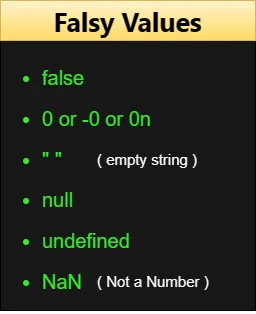
When JavaScript evaluates a value in a condition, it turns that value into a truthy or falsy decision. These are the falsy values:
false, 0, -0, 0n, "", null, undefined, and NaN. Everything else is truthy.
if (10) {
  console.log("Runs");
}

if ("hello") {
  console.log("Runs");
}

if (0) {
  console.log("Does not run");
}

if ("") {
  console.log("Does not run");
}
Type coercion is when JavaScript converts a value from one type to another during an operation. This conversion can happen implicitly, without you calling a conversion function.
console.log("5" + 3); // "53": string concatenation
console.log("5" - 3); // 2: string converted to number
console.log(true + 1); // 2: true becomes 1
console.log(false + 1); // 1: false becomes 0
The + operator can perform numeric addition or string concatenation depending on its operands. Other arithmetic operators commonly convert numeric strings to numbers.
== allows type coercion before comparing. === compares without that same implicit coercion and requires matching types as well as matching values.
console.log("5" == 5); // true
console.log("5" === 5); // false=== in normal modern JavaScript code unless you have a specific reason to use ==. This is coding guidance, not a language restriction.Sometimes you do not want JavaScript to guess. You can explicitly convert a value yourself with Number(), String(), or Boolean().
console.log(Number("42")); // 42
console.log(String(42)); // "42"
console.log(Boolean(1)); // true

const quantity = Number("20");
console.log(quantity + 5); // 25
Explicit conversion makes your intent clearer. When input may be invalid, check for NaN:
const input = "20";
const quantity = Number(input);

if (Number.isNaN(quantity)) {
  console.log("Invalid number");
}
For values that do not convert to a number, Number() can produce NaN, which means “Not a Number.”
typeof nullreturns"null": It actually returns"object"because of historical behavior."5" + 3means8: It produces"53"because+can concatenate strings.- Using
==without understanding coercion: Prefer===in normal modern code. - Thinking
constmakes objects immutable:const user = { name: "John" };allowsuser.name = "Alex", but notuser = {};. - Guessing what is falsy: Use the actual falsy list instead of relying on whether a value looks empty.
Predict the result before reading the answers:
- What will
console.log(typeof "Hello")print? - What will
console.log(typeof null)print? - What will
console.log("5" + 2)print? - What will
console.log("5" === 5)print? - Is
Boolean("")truthy or falsy?
"string", "object", "52", false, and false.Use the existing datatype exercises and quiz for hands-on practice.
Exercise 1Exercise 2Exercise 3Exercise 4Datatype quiz- Data: Information a program can store and use.
- Value: A specific piece of data.
- Data type: Describes what kind of value something is.
- Primitive values: string, number, bigint, boolean, undefined, null, and symbol.
- Objects: Values that can contain collections of values; arrays and functions are objects.
typeof: Inspects a value and returns a type or category string.nullvsundefined: Null is intentionally empty; undefined commonly means no value is available.- Truthy/falsy: Affects how values behave in conditions.
- Coercion: JavaScript may implicitly convert values during operations.
- Equality:
===avoids the coercion behavior of==. - Explicit conversion: Use
Number(),String(), andBoolean()when you want control.
typeof value to inspect it, explicit conversion when you want control, and usually === for equality.What's next? Now that you understand the kinds of values JavaScript works with, learn how to display those values and results in the Output tutorial.
- Define data and value in programming. How are they related?
- What is a data type?
- What are the different JavaScript data types?
- What is the difference between primitive values and objects?
- What is type coercion, and how does implicit conversion differ from explicit conversion?
- How do you perform manual type conversion?


Datatype In Javascript