JavaScript loop & Switch
Loops and switch statements help you write less code and handle repeated or branching logic cleanly. They are core tools in almost every real project.
Loops repeat code without requiring the same statements again and again. Three repeated calls are easy to write, but a loop scales when the amount of work changes.
console.log("Hello");
console.log("Hello");
console.log("Hello");

for (let i = 0; i < 3; i++) {
  console.log("Hello");
}
switch is different from loops: it chooses one branch from several exact possible values.
A loop repeatedly executes a block while a condition or iteration rule allows it to continue. One execution of the loop body is an iteration.
for (let i = 0; i < 3; i++) {
  console.log(i);
}
// Iterations: i = 0, i = 1, i = 2
// Stop when i = 3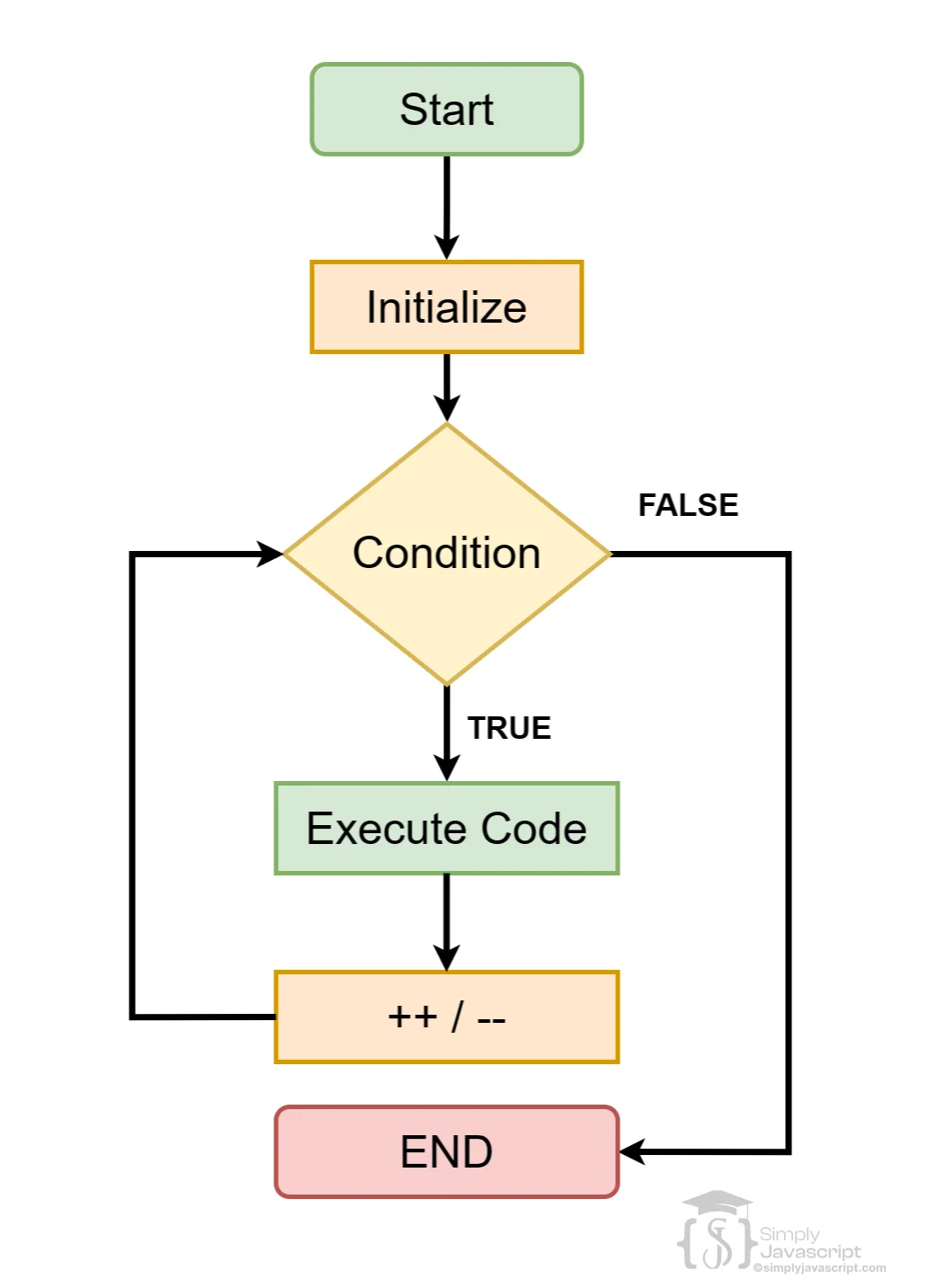
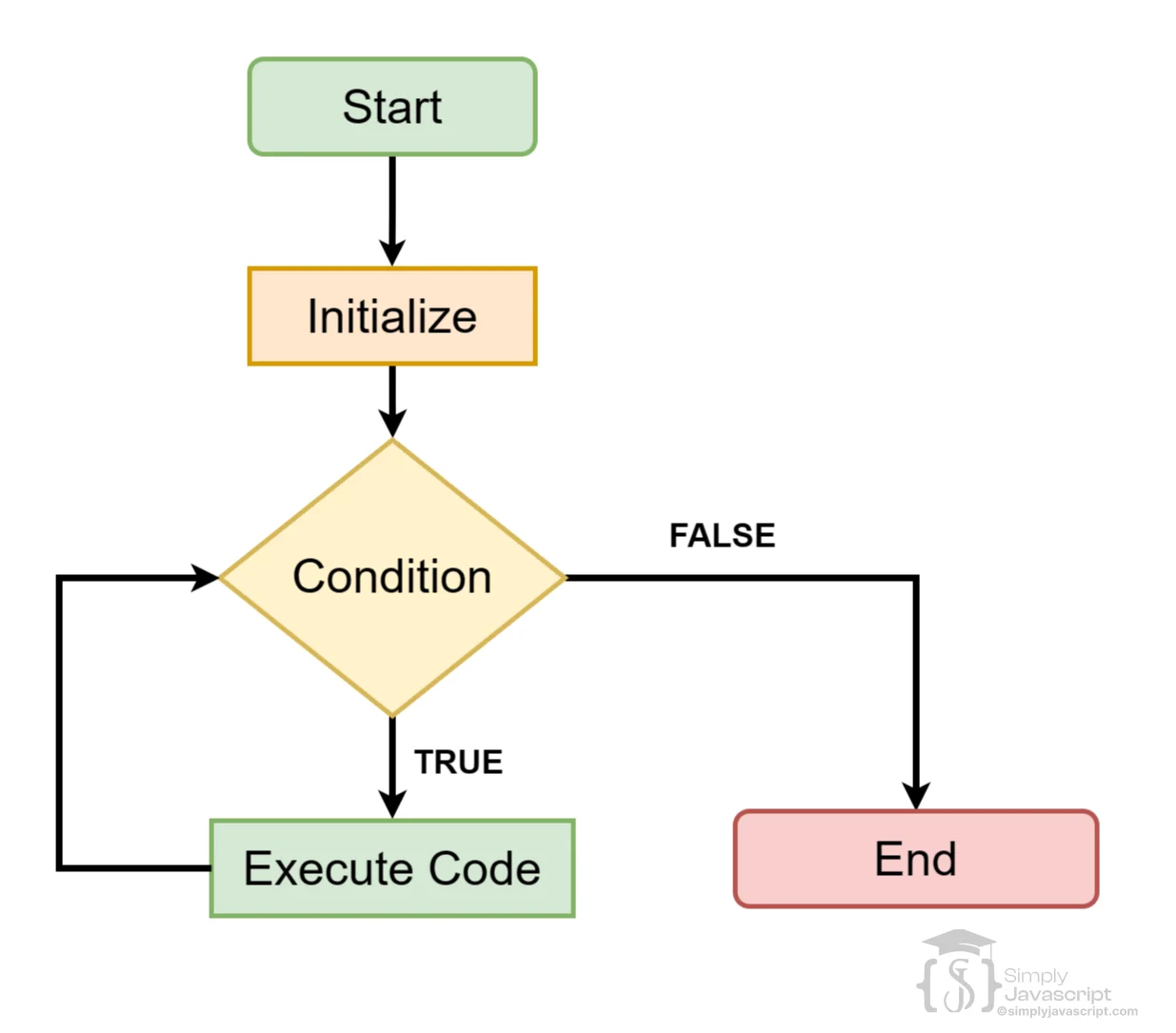
A for loop puts initialization, condition, and update in one place.
for (initialization; condition; update) {
  // code to execute
}

for (let i = 0; i < 10; i++) {
  console.log(i);
}- Initialization: runs once before the first iteration.
- Condition: is checked before every iteration; false stops the loop.
- Update: runs after each iteration and moves the loop toward stopping.
for...of iterates over values produced by an iterable. Arrays and strings are common examples.
const numbers = [1, 2, 3, 4, 5];
for (const number of numbers) {
  console.log(number);
}

for (const character of "JavaScript") {
  console.log(character);
}
variable receives the current value; iterable is the collection or sequence being visited.
| Need | Recommended |
|---|---|
| Each value from an array | for...of |
| The array index | for |
| Custom increments or backwards iteration | for |
| Simple value iteration | for...of |
const fruits = ["Apple", "Banana", "Mango"];
for (const fruit of fruits) console.log(fruit);

for (let i = 0; i < fruits.length; i++) {
  console.log(i, fruits[i]);
}
Use while when repetition depends mainly on a condition rather than a predefined counter. The condition is checked before each iteration, so the loop may run zero times.
let i = 0;
while (i < 10) {
  console.log(i);
  i++;
}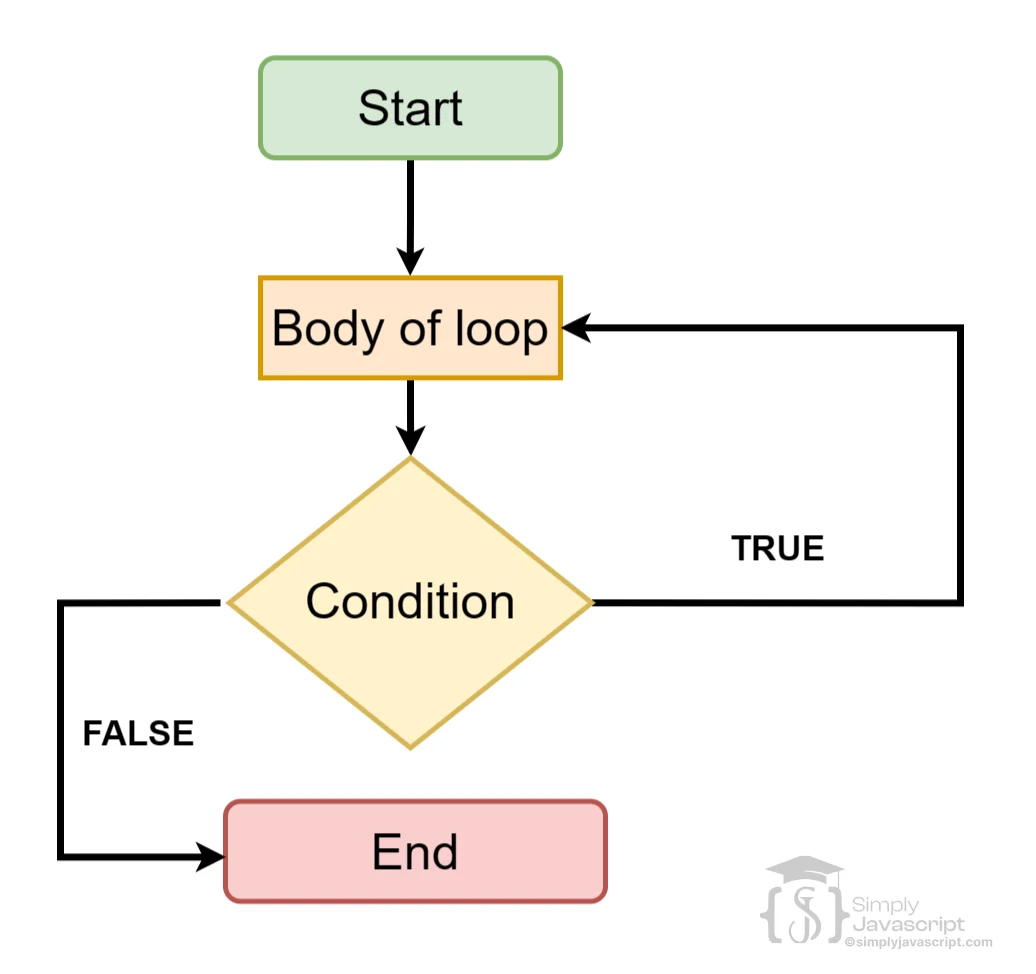
do...while runs the body at least once because it checks the condition after the body.
let i = 0;
do {
  console.log(i);
  i++;
} while (i < 10);

let count = 10;
do {
  console.log("This runs once");
} while (count < 5);
while may run zero times; do...while runs at least once.
for...in iterates over enumerable property keys.
const user = {
  name: "Aarav",
  age: 21,
  city: "Jaipur"
};
for (const key in user) {
  console.log(key, user[key]);
}
// name Aarav, age 21, city Jaipur
for...of gives values; for...in gives keys. For arrays, prefer for...of for values. for...in can also include inherited enumerable properties.
break immediately exits the nearest enclosing loop. In a switch, it exits the switch statement.
for (let i = 0; i < 10; i++) {
  if (i === 5) break;
  console.log(i); // 0 1 2 3 4
}continue skips the remaining statements in the current iteration of the nearest enclosing loop and proceeds to the next iteration.
for (let i = 1; i <= 5; i++) {
  if (i === 3) continue;
  console.log(i); // 1 2 4 5
}
break exits completely; continue skips only the current iteration.
A nested loop is a loop inside another loop. For every iteration of the outer loop, the inner loop completes all of its iterations.
const grid = [
  ["A1", "A2"],
  ["B1", "B2"]
];
for (const row of grid) {
  for (const cell of row) {
    console.log(cell);
  }
}
Nested loops fit multidimensional data such as rows and columns. If the outer and inner loops each run three times, the inner body can run nine times. Avoid unnecessary nesting because it makes code harder to understand and increases the work.
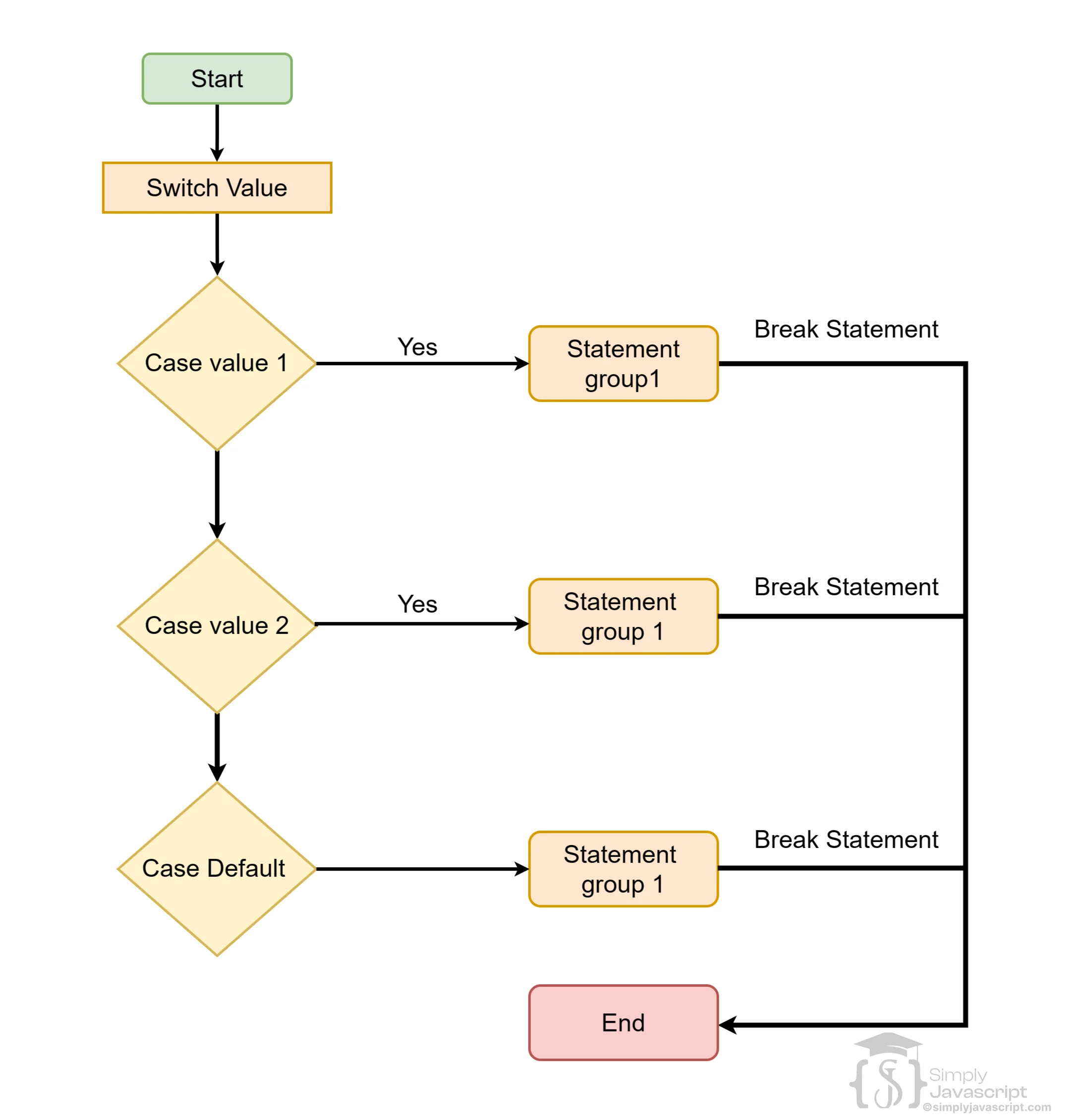
A switch compares one expression against several exact case values. Matching uses strict comparison semantics.
const day = "Monday";
switch (day) {
  case "Monday":
    console.log("Today is Monday.");
    break;
  case "Tuesday":
    console.log("Today is Tuesday.");
    break;
  default:
    console.log("Another day.");
}
switch evaluates the expression, checks cases, runs the match, and uses break to exit. default runs when no case matches.
| Situation | Usually clearer |
|---|---|
| One value and several exact values | switch |
| Complex conditions or ranges | if...else |
Conditions using && or || | if...else |
| Fixed states such as loading/success/error | switch |
const status = "success";
switch (status) {
  case "loading": console.log("Loading..."); break;
  case "success": console.log("Success!"); break;
  case "error": console.log("Something went wrong."); break;
  default: console.log("Unknown status.");
}Without break, JavaScript continues into following cases until it reaches a break or the end. This can intentionally group cases, but accidental fall-through can surprise readers.
const grade = "A";
switch (grade) {
  case "A":
  case "B":
    console.log("Passing grade");
    break;
  default:
    console.log("Other grade");
}
default runs when none of the cases match.
const status = "unknown";
switch (status) {
  case "success": console.log("Success"); break;
  case "error": console.log("Error"); break;
  default: console.log("Unknown status");
}| Question | Use | Example |
|---|---|---|
| Need an index or custom counter? | for | Every second item |
| Need each iterable value? | for...of | Read product names |
| Need object property keys? | for...in | Inspect object properties |
| Repetition depends on a condition? | while | Read until a queue is empty. |
| Must run once first? | do...while | Show a menu |
| Need exact value matching? | switch | Handle success/error/loading |
for means counter/index; for...of means values; for...in means keys; while means condition-controlled repetition; do...while means run once then check; switch means exact values.
A loop becomes infinite when its stopping condition never becomes false.
let i = 0;
while (i < 5) {
  console.log(i);
  i++;
}

// Without i++, the condition never changes.
// Do not run that version in an interactive playground.- What starts the loop?
- What condition stops it?
- What changes on every iteration?
- Can the condition become false?
- Forgetting to update a
whileloop variable. - Using
for...infor array values instead offor...of. - Forgetting
breakin a switch when fall-through is not intended. - Forcing every problem into a classic
forloop. - Using excessive nested loops when the data does not have multiple dimensions.
for→ control the counter or index.for...of→ receive each value.for...in→ receive each enumerable key.while→ continue while a condition is true.do...while→ run once, then check.break→ stop the nearest loop or switch.continue→ skip the current iteration.switch→ choose based on exact values.
Keep practicing from simple repetition to nested patterns.
Beginner
- Print numbers from 1 to 10.
- Print even numbers and calculate a sum.
- Iterate over an array with
for...ofand an object withfor...in. - Write a
whileand ado...whileloop.
Control Flow
- Use
breakandcontinue. - Write a
switchwith adefaultcase. - Demonstrate intentional fall-through.
Nested Loops
Retain the existing interactive pattern practice: square, right triangle, inverted triangle, hollow rectangle, number pyramid, and diamond. Use the existing “View example pattern” controls to compare your output.
forcontrols initialization, condition, and update.for...ofiterates values;for...initerates enumerable keys.whilerepeats while a condition is truthy;do...whileruns at least once.- Nested loops fit multidimensional data.
switchhandles exact value matching.breakexits the nearest loop or switch;continueskips the current iteration.- Infinite loops happen when the stopping condition never becomes false.
- What is a loop and what's the use of it in programming?
- Explain for loop.
- Explain the
for...ofloop. - Explain the
for...inloop. - Explain the while loop.
- Explain the difference between for and while.
- Explain the do...while loop.
- Explain nested loops.
- Explain switch.
- Explain break and continue.
- Explain default in switch.
- Explain switch case sensitivity.
- Explain switch fall-through.


loop and Switch In Javascript
