JavaScript Features
When you understand JavaScript features, the language stops feeling random and starts feeling logical. You write better code faster because you know which strengths to use in real projects.
JavaScript has several characteristics that make it different from languages such as Java, C++, and Python. These characteristics explain why JavaScript feels flexible, works in browsers, and can also run in other environments.
Important: You do not need to master all of these ideas before you start coding. This page is an overview and roadmap. Use the detailed lessons to learn one feature properly when you are ready.
These characteristics are not separate tricks. They work together whenever a JavaScript application runs:
- You write JavaScript.
- A JavaScript engine executes and optimizes it.
- The engine manages memory automatically.
- Functions and objects give you flexible ways to organize behavior.
- The main thread runs JavaScript one piece at a time.
- The event loop coordinates asynchronous work.
- The runtime provides environment-specific APIs.
- Your application runs in a browser, Node.js, or another compatible environment.
Big picture: JavaScript is practical because the language, engine, runtime, and asynchronous APIs work together.
You do not need to memorize every definition today. Keep this short list as your roadmap:
- JavaScript is high-level.
- JavaScript engines execute and optimize JavaScript.
- Garbage collection manages unreachable memory automatically.
- JavaScript supports multiple programming styles.
- Functions are values.
- JavaScript is dynamically typed.
- Objects use prototypes for inheritance.
- JavaScript on the main thread runs one piece at a time.
- The event loop coordinates asynchronous work.
- JavaScript can run in multiple environments.
You will understand each feature properly as you progress through the detailed tutorials.
Start with the basics, then follow the links for the feature you want to use. Each row answers three questions: what the feature helps you do, which lesson explains it in depth, and what to practice first.
| Feature | Why it matters | Detailed lesson | First practice |
|---|---|---|---|
| Memory management | Understand how unreachable objects can be cleaned up. | Memory Management | Create an object, remove its reference, and identify when it becomes unreachable. |
| Values and types | Recognize the types of values your JavaScript code works with. | Data Types | Compare a number, string, and boolean with typeof. |
| Functions and closures | Reuse behavior and preserve values between calls. | Functions | Write a function that returns another function. |
| Objects and prototypes | Model data and share behavior between objects. | Objects and Prototypes | Create an object, add a method, and trace a missing property through its prototype. |
| Modern data syntax | Copy, unpack, and transform arrays and objects clearly. | Destructuring and Spread | Extract two properties and merge two arrays without changing the originals. |
| Promises and async code | Work with results that arrive later, such as API responses. | Promises and Async/Await | Handle a resolved value and a rejected error with then/catch, then rewrite it with async/await. |
| Event loop and background work | Understand scheduling and keep the interface responsive. | Event Loop and Web Workers | Predict the order of a timer and Promise, then identify a task that needs a worker. |
| Classes and modules | Organize larger applications into reusable structures. | Classes and Modules | Export one function or class and import it into a second file. |
Suggested order: finish Setup, then learn functions and objects, modern data syntax, Promises and Async/Await, the Event Loop, and finally Modules and Classes. You can jump to a row when a project gives you a specific need.
How to use this page: choose one link, complete its examples, build a tiny variation without copying, and return here only after you can explain what problem the feature solves.These are characteristics of JavaScript, not a checklist you must master before writing code. Think of this as a map: each feature will make more sense when you meet it in a later lesson.
| Feature | Simple meaning |
|---|---|
| High-level | You focus on what the program should do instead of hardware details. |
| Garbage collected | Unused memory can be reclaimed automatically. |
| Multi-paradigm | You can use different programming styles. |
| Prototype-based | Objects can inherit behavior through prototypes. |
| First-class functions | Functions can be stored, passed, and returned. |
| Dynamically typed | Values have types that are determined while the program runs. |
| Single-threaded main execution | One piece of JavaScript runs at a time on the main thread. |
| Event loop | Asynchronous work is coordinated without blocking current JavaScript. |
| Engine optimization | The engine can optimize frequently used code while it runs. |
| Cross-platform | JavaScript can run in environments that provide a compatible engine and APIs. |
JavaScript is a high-level language, which means it provides abstractions that let you focus on what your program should do instead of managing hardware details such as memory addresses or CPU instructions.
Other high-level languages include Python, Java, and C#. They hide many low-level details, although each language still has its own syntax, rules, and learning curve.
// JavaScript reads almost like plain English
let ages = [12, 25, 17, 30, 15];

// Find all adults (18 and over) in one readable line
let adults = ages.filter(function(age) {
  return age >= 18;
});

console.log(adults); // [25, 30]

// A low-level language would require you to manually
// manage memory addresses and CPU register values.
// JavaScript handles all of that for you automatically.When your JavaScript code runs, it uses memory. Sometimes, it creates things that are no longer needed. Garbage collection is how JavaScript engines automatically manage memory and clean up memory that is no longer reachable.
Imagine a self-cleaning kitchen. You cook (write code), and the leftovers (unused memory) can be cleaned up for you. JavaScript handles the cleanup automatically, but keeping unnecessary references can still create memory leaks. You will learn more about memory management later.


// Step 1: Create an object and memory is allocated
let user = { name: "Alice", age: 30 };
console.log(user.name); // Alice

// Step 2: Remove the only reference to it
user = null;

// The object { name: "Alice", age: 30 } is now unreachable.
// JavaScript's garbage collector can reclaim that memory automatically.
// You do not control exactly when that cleanup happens.
console.log(user); // nullYour JavaScript code needs something to execute it. That something is a JavaScript engine. Chrome uses V8, Firefox uses SpiderMonkey, and Safari uses JavaScriptCore. Node.js also uses a JavaScript engine so JavaScript can run outside the browser.
Modern engines use a mixture of techniques, including interpretation and compilation. With Just-In-Time (JIT) optimization, frequently used code can be optimized while your program is running. You write JavaScript; the engine handles how to execute it efficiently.
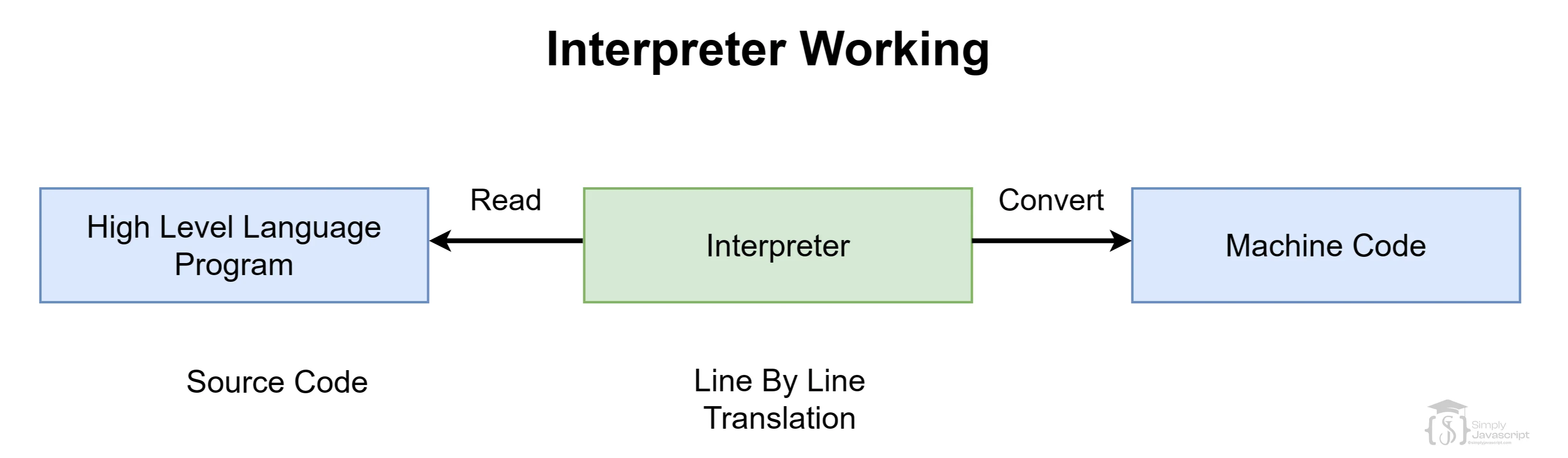
// JavaScript runs without a manual compile step

console.log("Line 1 runs first");
console.log("Line 2 runs second");
console.log("Line 3 runs third");

// JIT may optimize frequently used code behind the scenes.
// From your perspective: just write the code and run it.
let score = 42;
console.log("Score:", score); // Score: 42JavaScript supports multiple programming styles (called "paradigms"). You are not locked into one way of writing code.
You can write procedural code (step-by-step instructions), object-oriented code (organizing data and behavior together), or functional code (combining small functions). You are not forced to use one specific style.
// The same task can be organized in different styles.
const price = 100;
const addTax = (amount, rate) => amount + amount * rate;

console.log(addTax(price, 0.2)); // 120

// Later lessons will show procedural, object-oriented,
// and functional styles in more detail.In JavaScript, objects can inherit properties and behaviors from other objects through something called a prototype. A prototype is essentially a template that an object can look up to.
When you use a property that an object does not have, JavaScript can look to its prototype for that property. The lookup can continue through a prototype chain. You can inspect a prototype with Object.getPrototypeOf(); beginners do not need to use the legacy __proto__ accessor directly.
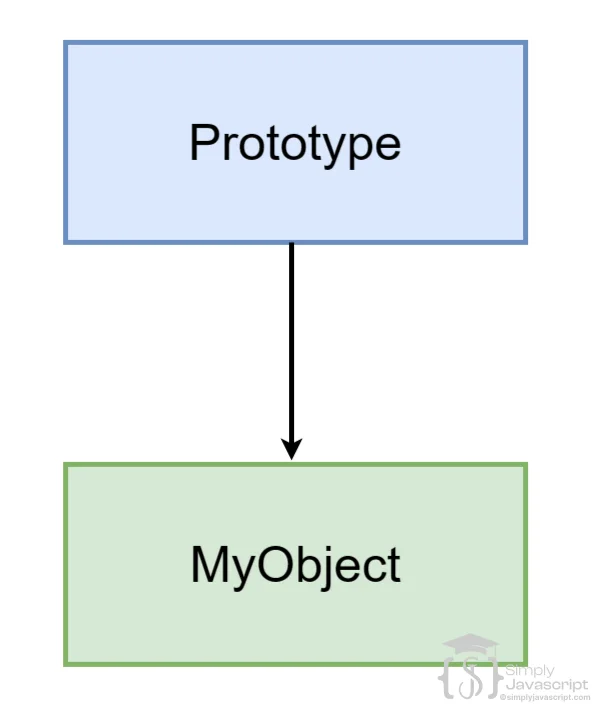
// Every object can inherit from another via its prototype

const animal = {
  type: "Animal",
  describe() {
    return "I am a " + this.type;
  }
};

// dog inherits from animal via the prototype chain
const dog = Object.create(animal);
dog.type = "Dog";
dog.bark = function() { return "Woof!"; };

console.log(dog.describe()); // "I am a Dog"  (inherited from animal)
console.log(dog.bark());     // "Woof!"        (dog's own method)

// Confirm the prototype link
console.log(Object.getPrototypeOf(dog) === animal); // trueIn JavaScript, functions are treated like any other value. You can store a function in a variable, pass it as an argument, or return it from another function. This is what "first-class functions" means.
This makes powerful patterns possible, like higher-order functions and closures. We'll explore both in detail in the functions tutorial.
// Define a function
function greet(name) {
  return "Hello, " + name + "!";
}

// Assign the function to a variable
const fn = greet;

// Call the function using the variable
const result = fn("John");

// Output the result
console.log(result);In JavaScript, values have types, but variables do not have fixed declared types in the way they do in statically typed languages. A variable can hold a number now and a string later. The type is determined while the program runs. This is called dynamic typing.
In languages like Java or C, a variable is commonly declared with a type. In JavaScript, the same variable can later hold a different kind of value. This gives you flexibility, but it also means you need to be careful about unexpected type changes.
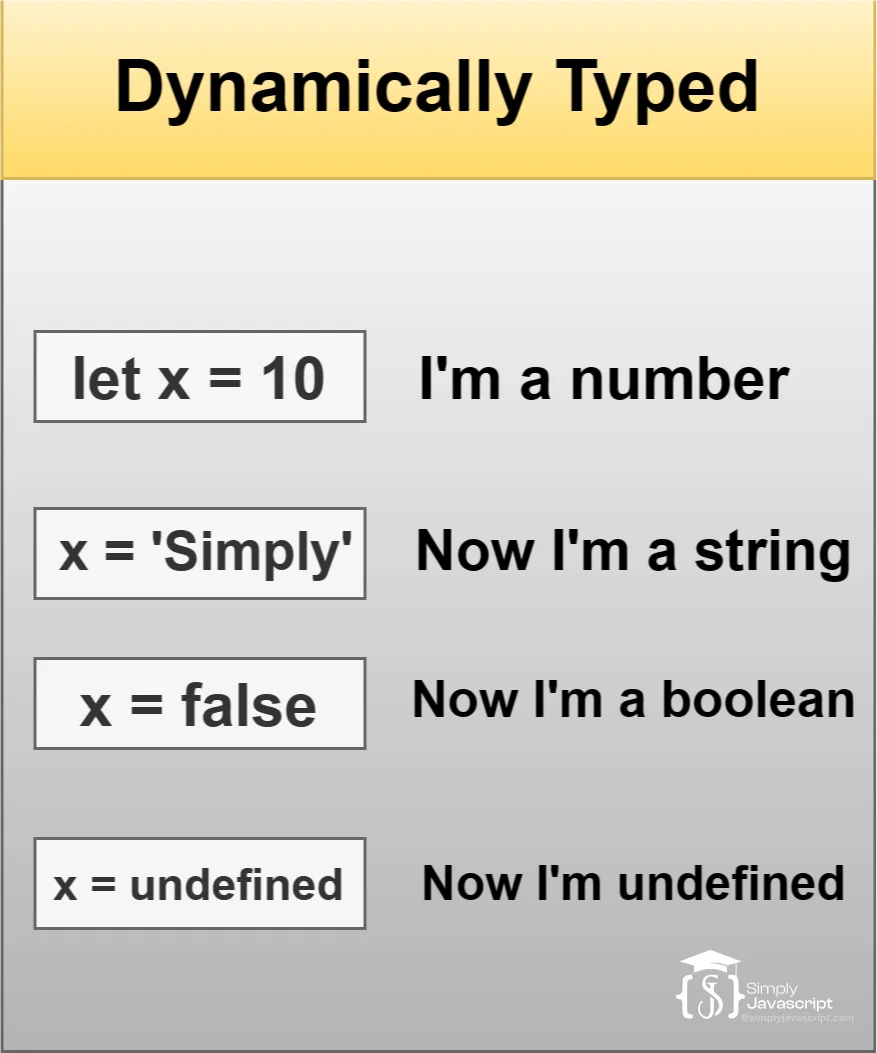
let x = 10; // x currently holds a number
x = "SimplyJavascript"; // now x holds a string
x = false; // now x holds a booleanJavaScript code on the main thread runs one piece at a time. It is like a single-lane road: only one piece of JavaScript runs on that thread at any moment.
Browsers provide Web APIs for tasks such as timers and network requests, and Web Workers can run some work away from the main thread. These tools prepare the way for asynchronous JavaScript without changing the basic rule: one piece of JavaScript runs at a time on the main thread.
// On the main thread, JavaScript runs one step at a time

console.log("Task 1: Start");

let total = 0;
for (let i = 1; i <= 5; i++) {
  total += i; // each step happens one at a time
}

console.log("Task 2: Sum =", total); // Sum = 15
console.log("Task 3: Done");

// Output is always in this exact order:
// Task 1: Start
// Task 2: Sum = 15
// Task 3: DoneEven though JavaScript on the main thread runs one thing at a time, it does not have to freeze while it waits for a network request, timer, or user interaction. This is where the event loop helps.
The event loop works like a queue coordinator. Browser or runtime APIs handle waiting tasks, and queued callbacks get a turn after the current JavaScript finishes. This lets JavaScript coordinate asynchronous work without blocking the main thread.
// The event loop gives queued work a turn after current code finishes

console.log("1");

// setTimeout schedules work for later
setTimeout(() => {
  console.log("3");
}, 0);

console.log("2");

// Output order:
// 1
// 2
// 3JavaScript can run in browsers, Node.js, and other runtimes when they provide a compatible JavaScript engine and the APIs that the program uses. This is what platform independence means; it does not mean that every JavaScript program works unchanged everywhere.
The language is shared, but environments provide different tools. Browsers provide APIs such as document, window, and navigator. Node.js provides APIs such as fs, process, and path.
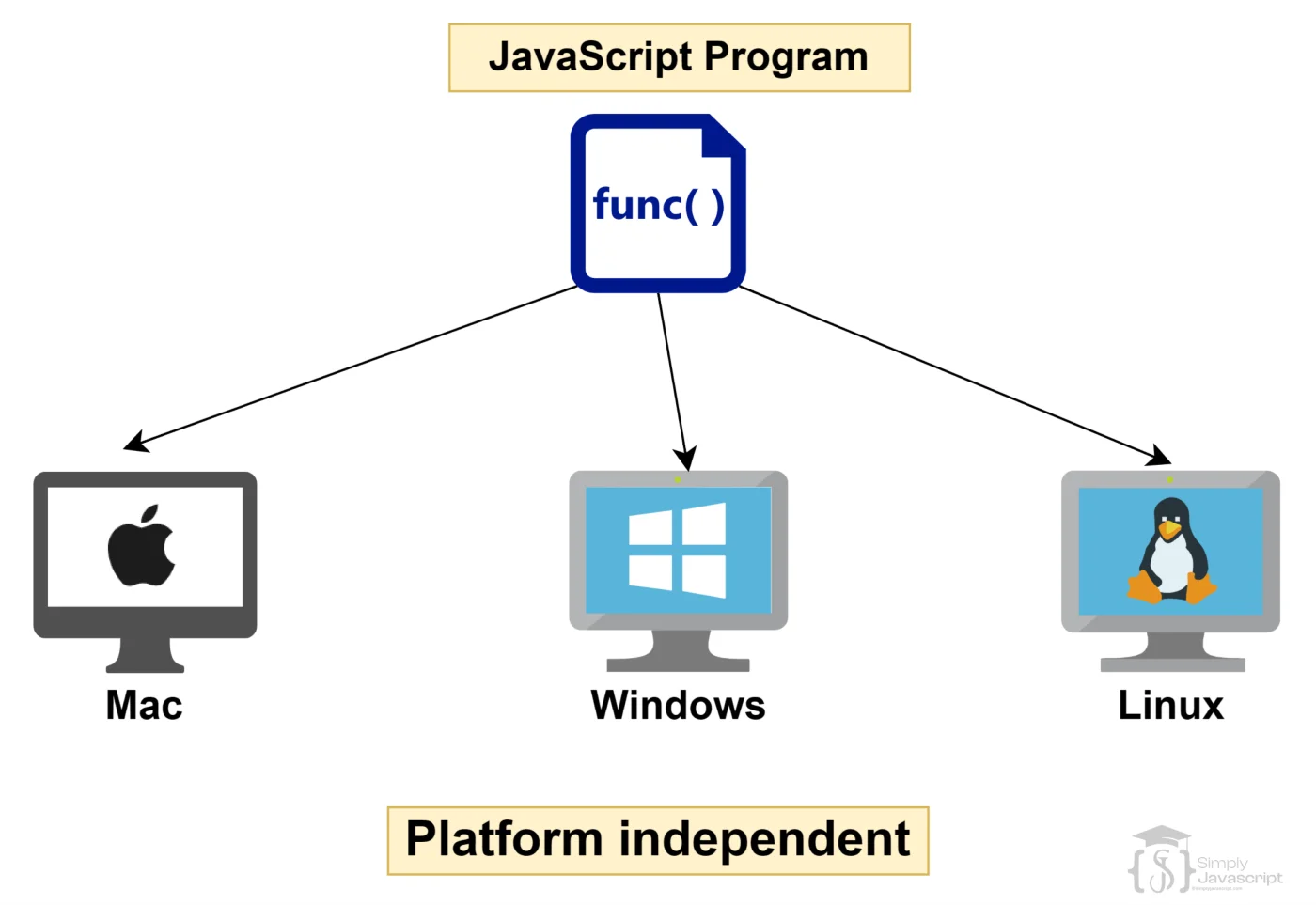
// This browser example can run in many browsers and operating systems

// Read runtime info about the user's browser and platform
console.log("Browser:", navigator.userAgent);

// Detect if the user is on a mobile device
let isMobile = /Mobi|Android/i.test(navigator.userAgent);
console.log("Mobile device?", isMobile);

// This can work unchanged on:
// Chrome on Windows, Safari on iPhone,
// Firefox on Linux, Edge on Mac- High-level: You focus on what the program should do instead of hardware details.
- Automatic memory management: Garbage collection can reclaim memory that is no longer reachable.
- JavaScript engine: An engine executes and can optimize your code while it runs.
- Multi-paradigm: You can use procedural, object-oriented, or functional styles.
- Prototype-based objects: Objects can inherit behavior through prototypes.
- First-class functions: Functions can be stored, passed, and returned.
- Dynamic typing: Values have types, and a variable can hold different kinds of values over time.
- Main-thread execution: One piece of JavaScript runs at a time on the browser's main thread.
- Event loop: Asynchronous work is coordinated without blocking current JavaScript.
- Cross-platform: JavaScript can run in compatible environments with their required APIs.
What's next? Now that you understand what makes JavaScript different, it is time to start writing JavaScript yourself. Begin with variables and identifiers.
- Explain all the JavaScript features in detail?
- Explain the concept of automatic memory management through garbage collection. How does it benefit developers in languages like JavaScript?
- Differentiate between interpreted and compiled languages.
- How does JavaScript support multiple programming paradigms?
- Explain the concept of prototype-based inheritance in JavaScript. How does it differ from classical inheritance in languages like Java or C++?
- Define first-class functions in programming languages. How does JavaScript treat functions as first-class citizens, and what advantages does it offer?
- How does JavaScript's dynamic typing differ from statically typed languages?
- Explain what it means for JavaScript to be single-threaded. What are the implications of this for concurrency and performance in web applications?
- What is the event loop, and how does it help with asynchronous programming?
- Explain the significance of JavaScript being platform-independent.
- What is Just-In-Time compilation ? Explain benefits.

Features In Javascript