JavaScript Variables & Identifiers
Variables and identifiers are the foundation of every JavaScript program. If you name things clearly and choose var, let, and const correctly, your code becomes easier to read, debug, and maintain.
Programs need to store and work with data. Variables give us a way to give a name to a value so our code can use it later.
Imagine labeled boxes: age holds 30, name holds "Sajid", and salary holds 50000. The label is how your code finds the value inside.
In this tutorial, you will learn JavaScript variables, identifiers, var, let, and const. You will then see how scope, reassignment, redeclaration, hoisting, and the Temporal Dead Zone (TDZ) explain their behavior.
A variable is a named binding that allows JavaScript code to access a value. Start with this simple example:
const age = 30;
console.log(age);constis the declaration keyword.ageis the identifier, or name.30is the value.=assigns the value during initialization.
let name = "John";
console.log(name);

let score = 10;
score = 20;
console.log(score); // 20
The let example can be reassigned. A const binding cannot be reassigned:
const country = "India";An identifier is a name used to identify something in JavaScript. A variable is a named binding that uses an identifier, but identifiers are not limited to variables.
const age = 30;

// age is the identifier and 30 is the value
function calculateTotal() {}
// calculateTotal is an identifier
class User {}
// User is an identifier
This distinction helps: a variable is the named connection your program uses to access a value; an identifier is the name used for a variable, function, class, or another named declaration.
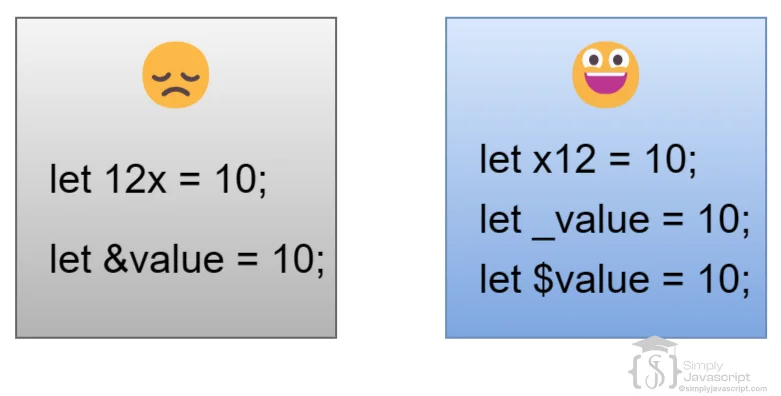
Identifiers must follow JavaScript's syntax rules. These are valid:
let age;
let userName;
let _count;
let $price;
let user123;
These are invalid because they begin with a digit, contain a hyphen, or contain a space:
let 123user;  // invalid
let user-name;  // invalid
let user name; // invalid- Begin with a letter,
_, or$. - After the first character, digits are allowed.
- Spaces and hyphens are not allowed in normal identifiers.
- Reserved keywords cannot be used as identifiers.
- JavaScript is case-sensitive:
ageandAgeare different identifiers.
Use camelCase for everyday names, such as firstName, accountBalance, and totalPrice. UPPER_SNAKE_CASE is a convention often used for values treated as constants, such as const MAX_RETRY_COUNT = 3;. JavaScript does not enforce that style.
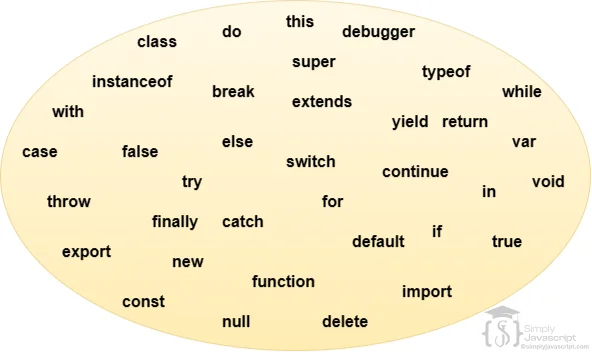
Some words already have special meaning in JavaScript, so they cannot normally be used as identifiers. Examples include if, else, for, function, class, return, const, and let.
let function = "test"; // SyntaxErrorYou do not need to memorize the complete list. When in doubt, check the list of JavaScript keywords on MDN.
JavaScript has three declaration keywords. Use this simple mental model first:
const: use when the binding should not be reassigned.let: use when the value needs reassignment.var: an older declaration style, generally avoided in modern code.
const name = "Sajid";

let score = 10;
score = 20;

var count = 1;
count = 2;Use const when a binding should keep pointing to the same value. It must be initialized immediately and cannot be redeclared or reassigned.
const age = 30;
// age = 31; // TypeError: assignment to a constant binding
// const country; // SyntaxError: missing initializerconst prevents reassignment of the binding; it does not make an object or array deeply immutable.const numbers = [1, 2];
numbers.push(3); // allowed: the array contents changed
// numbers = [4, 5]; // error: the binding cannot be reassignedlet is for a binding whose value needs to change. It can be reassigned, but it cannot be redeclared in the same scope.
let age = 30;
age = 31;
console.log(age); // 31
It is also block-scoped. A block is the code between braces, such as the body of an if statement or loop.
{
  let message = "Hello";
  console.log(message);
}

// console.log(message); // ReferenceError
var is JavaScript's older variable declaration mechanism. It can be reassigned and redeclared, and it is function-scoped rather than block-scoped.
var age = 30;
age = 31;
var age = 40; // redeclaration is allowed- Can be reassigned and redeclared.
- Is function-scoped and does not respect ordinary block scope.
- Can be declared without an initial value.
- Is hoisted and initialized to
undefined.
Modern JavaScript generally prefers const and let because their reassignment and scope rules are easier to see. You will still encounter var in older code.
Scope answers one practical question: where can I access this variable?
{
  let x = 10;
  const y = 20;
  var z = 30;
}

// x and y are unavailable here
// z may still be available because var is not block-scoped
let and const are block-scoped. var is function-scoped. Exact top-level behavior also depends on whether the code is a classic browser script, an ES module, or another JavaScript environment. Learn more about Scope →
| Feature | var | let | const |
|---|---|---|---|
| Introduced | Since the beginning | 2015 (ES6) | 2015 (ES6) |
| Scope | Function | Block | Block |
| Redeclaration | Allowed | Not allowed in same scope | Not allowed in same scope |
| Reassignment | Allowed | Allowed | Not allowed |
| Must initialize? | No | No | Yes |
| Hoisting behavior | Initialized to undefined | Created during setup, unavailable before initialization | Created during setup, unavailable before initialization |
| TDZ | No | Yes | Yes |
A common misconception is that hoisting moves every declaration to the top and makes every variable safe to use early. A more precise explanation is that JavaScript processes declarations during environment setup before execution. The behavior depends on the declaration keyword.
console.log(count); // undefined
var count = 10;
For learning, this is a simplified mental model of what happens:
var count;
console.log(count);
count = 10;
This model describes the observable behavior; JavaScript does not literally rewrite your source code this way.
let and const declarations are created during setup, but they cannot be accessed before the declaration is initialized. That unavailable period is called the Temporal Dead Zone.
console.log(score); // ReferenceError
let score = 20;

console.log(limit); // ReferenceError
const limit = 30;
var can be read before its declaration and produces undefined. let and const produce a ReferenceError until their initialization line runs. Learn more about the Temporal Dead Zone.
const as your default choice, use let when the value needs to change, and generally avoid var in new code.const userName = "Sajid";
let score = 0;
score = score + 10;
// Use var mainly when reading or maintaining older code.Modern JavaScript Recommendation: Prefer const when reassignment is not required. Use let when reassignment is required. Avoid var in new code unless there is a specific reason to use it. This is modern coding guidance, not a language rule.
Try each exercise before checking your answer in a browser console or the JavaScript playground.
- Create a constant called
nameand store your name. - Create a
letvariable calledscore, assign10, then change it to20. - Try to reassign a
constvariable. What happens? - Create an invalid identifier and observe the syntax error.
- Predict the output before running this code:
console.log(x);
var x = 10;

console.log(y);
let y = 10;
Answer: The first log prints undefined. The second log throws a ReferenceError because y is in the TDZ.
- Identifier: A name used for a variable, function, class, or another named declaration.
- Variable: A named binding that lets code access a value.
- const: A block-scoped binding that must be initialized and cannot be reassigned.
- let: A block-scoped binding that can be reassigned but not redeclared in the same scope.
- var: A function-scoped, redeclarable, reassignable legacy declaration.
- Scope: The part of a program where a name can be accessed.
- Redeclaration: Declaring another binding with the same name in the same scope.
- Reassignment: Giving an existing binding a new value.
- Hoisting: The setup-time processing of declarations before code executes.
- TDZ: The period when
letandconstexist but cannot yet be accessed.
- What are identifiers in JavaScript? Give examples of valid and invalid identifiers.
- What rules and conventions should you follow when naming identifiers?
- What are reserved keywords?
- What is a variable and how does it store data?
- What is
const, and how does it differ from reassignment? - How does
letdiffer fromvarin scope and hoisting? - What are the scope and hoisting implications of
var? - What does
constprevent, and does it make objects immutable?


Variables And Identifier